Overview
Togeda is a music studio in the browser, built for several people to work in one project at the same time. Open https://studio.togeda.app and join the waitlist, or sign in if you have access (Sign in). Arrange, warp, mix and export with your collaborators, each on their own computer. Your own plug-ins and MIDI controllers run through Togeda Bridge, a small free app for Mac and Windows.
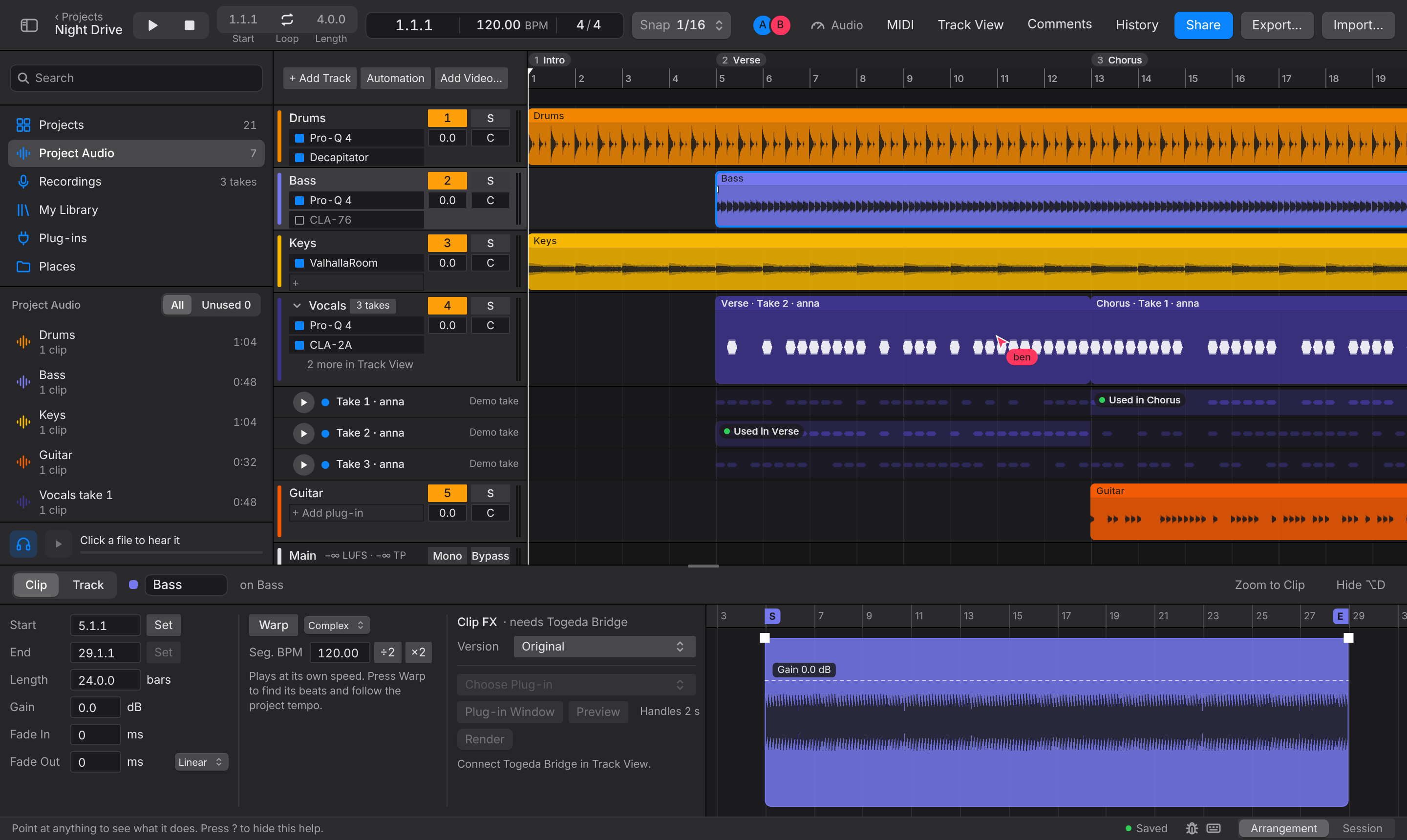
Work together in real time
Everyone in a project works on the same song at once. Edits appear for everyone as they are made and merge, so two people can work on the same track.
- Live presence: each person's name on their cursor and playhead, and who else is here in the toolbar.
- Comments: pinned to a moment and a track, with replies and Resolve.
- Version History: versions saved automatically as you work, named versions on demand, and Restore This Version for everyone.
- Roles and links: invite people, or turn on a share link, as Can view, Can comment or Can edit.
See Working together.
A studio in the browser, stored online
The studio needs no installer. Projects and their audio are stored online, so a project opens on any computer you sign in on. Audio you add is uploaded once and plays straight away, before the upload finishes. My Library keeps the audio from all your projects, ready to drag into the next one. If the connection drops, your changes wait on your computer and are sent when you are back.
Your plug-ins through Togeda Bridge
Browsers can't load plug-ins. Togeda Bridge hosts your Audio Units (Mac), VST3 and CLAP plug-ins next to the browser: their audio runs through Togeda, their windows open on your desktop. Bridge also brings in your MIDI controllers, prints plug-ins into exports and runs Commit Track. See Togeda Bridge.
Working to picture
For TV, film and post. Put the cut on a picture track at the top of the song and work in timecode, frame by frame.
- Picture track in sync with the sound, with a filmstrip and the cut marks edits snap to.
- Timecode in the toolbar and the ruler, from 23.976 to 60 fps, drop-frame included, with Go to Timecode and one-frame nudges.
- Spot a clip to a timecode, with a sync point.
- Cuts of the picture: link v13 when the editor sends it, and keep v12 to compare.
- Guide audio from the video's own sound, and a shared copy of the picture so every collaborator sees it.
See Working to picture.
In this guide
- Getting started: the waitlist and signing in, the demo song, projects, the project window, updates, adding audio, sharing
- Working together: live editing, roles, comments, versions, Project Audio, Session app jams
- Togeda Bridge: install it, pair it, use your plug-ins
- Working to picture: a video on a picture track, timecode, cut marks, cuts, guide audio, Spot
- Arrangement View: clips, ranges, crossfades, clip gain, tracks, inserts, takes
- Session View: the clip grid, scenes and launching
- Warping: fitting audio to the project's tempo
- Mixing: mixer, checks on Main, automation, sends and returns, routing, plug-in racks, Commit Track
- Export: stems, a mix, or a project for another DAW
- MIDI controllers: map knobs, faders and buttons on your controller
- Keyboard shortcuts
Shortcuts are written for Mac. On Windows, read Ctrl for Cmd and Alt for Option.