Session View
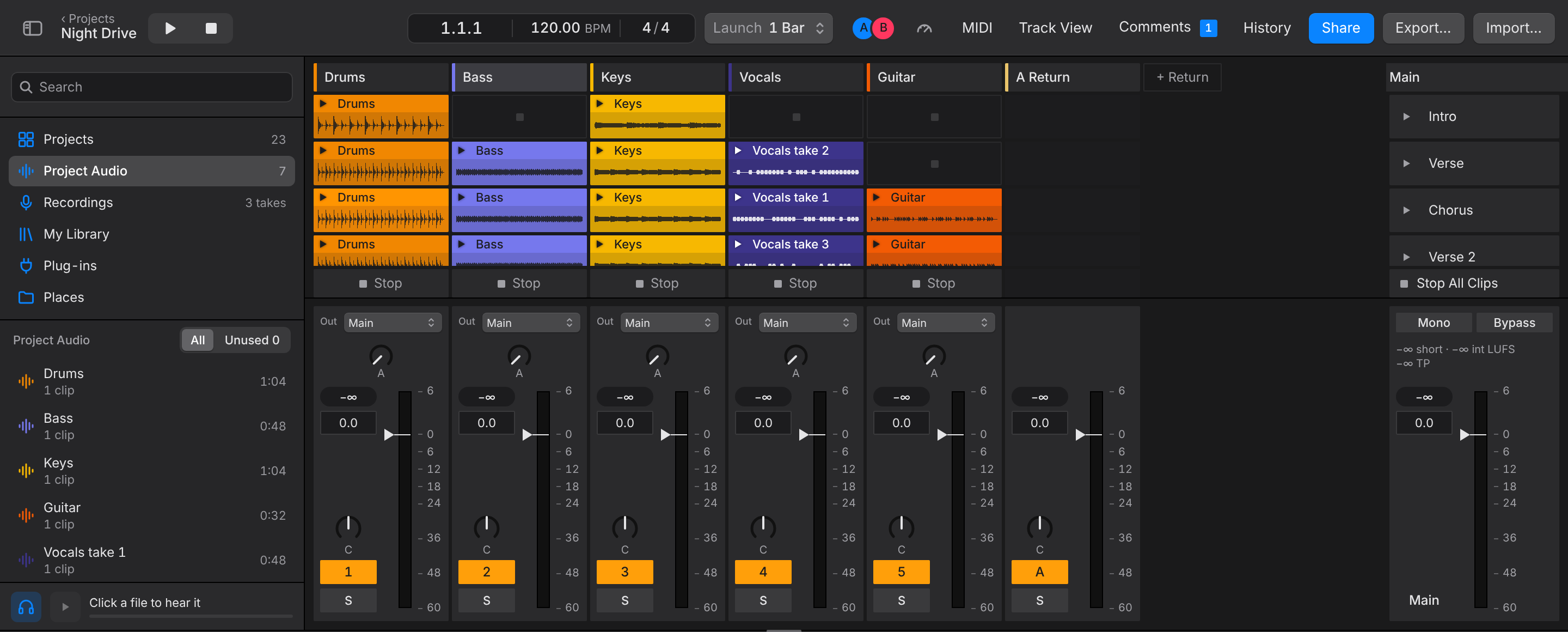
Session View is a grid of clips you start and stop while the song plays, as in Ableton Live. Use it to jam over the parts of a song, try arrangements, or audition ideas without touching the timeline. Press Cmd+= (or choose Session at the bottom right) to open it, as Pro Tools' Mix window. With Live keys it's Tab, as in Live, and with Logic keys Option+V or X.
Each column is a track, each row a scene. Under each column is that track's mixer; this is Togeda's mixer (see Mixing). With more tracks than fit, scroll sideways: the scene names in the Main column stay on the right.
Fill the grid
- Drop audio from the browser, or a clip from the arrangement, on a slot.
- Make Scenes from Sections builds one scene per section of the arrangement, so you can jam over the parts of your song.
- Add Scene adds an empty row. Double-click a scene or clip name to rename it.
Launch
- Click a clip's triangle to start it. It starts on the next bar; change this with the Launch pop-up at the top. A scene's triangle, in the Main column, starts its whole row.
- Stop All Clips stops them; the small square in an empty slot stops just that track.
- A track playing a Session clip stops playing its arrangement clips. Back to Arrangement puts it back: it shows under Main's name here and on its own line above the track headers in the arrangement.
Launching is personal: what you launch plays in your browser only, so each person can jam on their own. Changes to the clips and scenes themselves are shared like everything else.
Scenes and their clips travel with DAWproject files: an import adds the other DAW's clip launcher scenes after yours, and an export writes yours.
Cmd+= (Live keys: Tab, Logic keys: Option+V or X) goes back to the arrangement.